

Creatures N' Thingz
Simple [Colour Override] Variations in .lnz
Want to add Variations to your Breedfile?
Variations are both simple and complicated depending on how simple or complicated you want your variations to be. In this tutorial I will go from simple variations to something a little more complex.
This will by no means cover everything to do with Variations - but it'll hopefully be a good starting point!
What Programs should you use?
I highly recommend LnzPro I will be doing everything in LnzPro.
HERE is a link to LNZ Pro
HERE is a helpful guide to LNZ Pro Basics by Kalium's Petz
HERE is a great link to an explaination of palettes on UKC

Here is the petz palette as it is referenced in LNZ Pro
Coat colours:
10 - 19 is White
20 - 29 is Grey
30 - 39 is Black
40 - 49 is Cream
50 - 59 is Brown
60 - 69 is Orange/Ginger
80 - 80 is Red/Rust
90 - 99 is Liver Brown
100 - 119 is 'Blue'
120 - 125 is Dust/Tan
I personally tend to use the middle numbers for these colours...
(15, 25, 35, 45, 55... etc...)
For this I will be doing my variation examples in a section I will be adding to my Russian Blue.cat lnz called [Color Info Override]
You can add it anywhere in the file.
I will be adding it between [Eyelid Color] and [Add Ball]
Yes... Color and not Colour
[256 Eyelid Color]
30 0; COLOUR - GROUP
[Color Info Override]
[Add Ball]
...
In [Color Info Override] you have 4 data columns to work with.
Ball # - Color - Group - Texture
For example this is saying that I want ball #24 (head) to be the color 15 (white), be in group 0 and use Texture 1.
[256 Eyelid Color]
30 0; COLOUR - GROUP
[Color Info Override]
24 15 0 1
[Add Ball]
...
I'm going to only overwrite the color for this tutorial, so I will only need the first two columns. I don't need to bother with the group or texture for this example.
I am going to write an override that will make
the Russian Blue's head be replaced with white.
[256 Eyelid Color]
30 0; COLOUR - GROUP
[Color Info Override]
24 15
[Add Ball]
...
But doing this will make the head of the Russian blue ALWAYS white. We want it to SOMETIMES be white.

Majestic.
So let's add a variation to section so it will have a 1 in 2 chance of being white.
#2 is the 2nd variation and variations are always listed in descending order.
The values 24 15 are under #2 so they are a part of variation #2
#1 is the first variation and has nothing under it. This means this variation contains the original colour values. (not changed at all)
## is arguably the most important because the game needs this to know when the variations are being done read. This is the end of the list. It will break without it.
[256 Eyelid Color]
30 0; COLOUR - GROUP
[Color Info Override]
#2
24 15
#1
##
[Add Ball]
...
Now there will be a 50% chance of getting a Russian Blue with a white head and a 50% chance of getting a Russian Blue with it's normal head color!
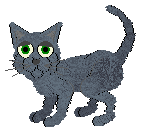
Double Majestic
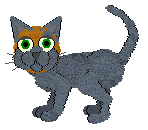
I want the head to have a chance to be not only white, but ginger and black too! So I'll add those variations in.

[256 Eyelid Color]
30 0; COLOUR - GROUP
[Color Info Override]
#4
24 35
#3
24 65
#2
24 15
#1
##
[Add Ball]
...
Ginger is 65, Black is 35, White is 15.
Quadruple Majesty?
25% chance for each!
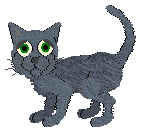
Now I want the bellies to match. It's easy to do because all I have to do is add the belly in each of the variation sections.
So I will add 2 for the belly and the colour into each section.


[256 Eyelid Color]
30 0; COLOUR - GROUP
[Color Info Override]
#4
24 35
2 35
#3
24 65
2 65
#2
24 15
2 15
#1
##
[Add Ball]
...
Still 25% chance for each.
What if you want the head and body to have a chance to be different colours but separate to each other?
Easy! Instead of each of them going under the same variant number, they each go in their own variant section.


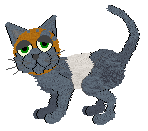
See? Now you can have every combination of head and belly - that is 4x4 or 16 variations!
That's a 6.25% chance for each combination to appear!
[256 Eyelid Colour]
30 0; COLOUR - GROUP
[Color Info Override]
;Head Colour
#4
24 35
#3
24 65
#2
24 15
#1
##
;Belly Colour
#4
2 35
#3
2 65
#2
2 15
#1
##
[Add Ball]
...
Annotate with ; and any text following it will not be seen by the program but can be used as a note for you!
That's it! You can do this in pretty much any section and with nearly as many sections as you'd like!
This doesn't deal with linked variations - that's a tutorial for the future.
I will also go about showing how to artificially increase the 'chances' of some variations.
Hope this helped!
- CreaNthi